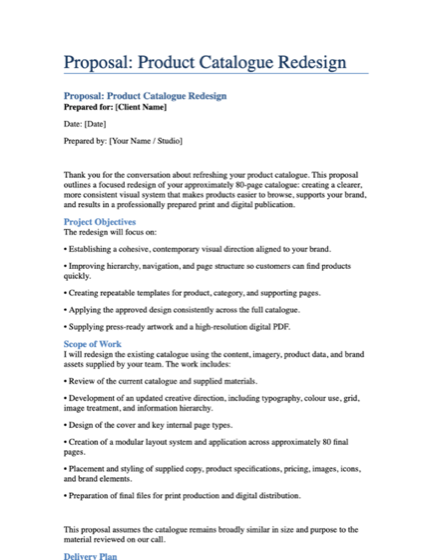
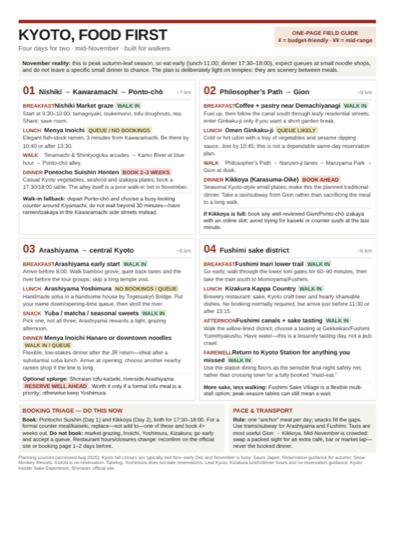
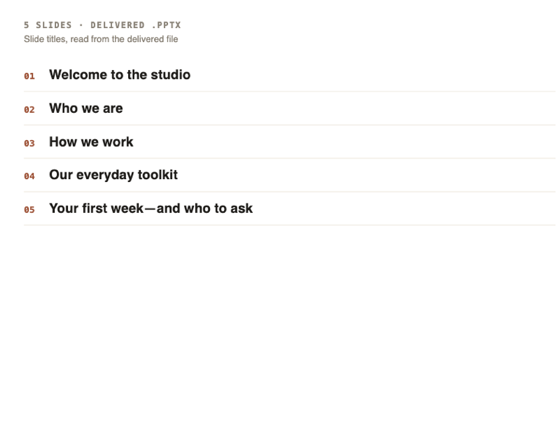
Comparison · Data as of 26 August 2026

Else vs ChatGPT:
it hands back the finished file.

ChatGPT gives you an answer to work from — then you open the app and build the thing. Else gives you the thing: a deck, a spreadsheet, a proposal, a site. Finished, delivered, and still running after you close the tab.

Start free — no card
The difference in one line

One gives you the recipe.
The other hands you dinner.

This is not about which one is smarter. It is about what is sitting in front of you when it stops talking.

A conversation you sit in
The answer
Here’s how I’d structure a one-pager for a dog-walking round. Keep it to five blocks:
A headline that says what you do, in the customer’s words
One short paragraph on the kind of walks you give
A booking button, high up, above the fold
“What I do” — three or four plain lines, no jargon
Then paste this into your site builder and pick a fo
The page is still yours to build

A good answer, in a chat window, that you now copy out and turn into the actual page. The work between the answer and the artifact is still yours, and so is the evening it takes.

A job you hand off
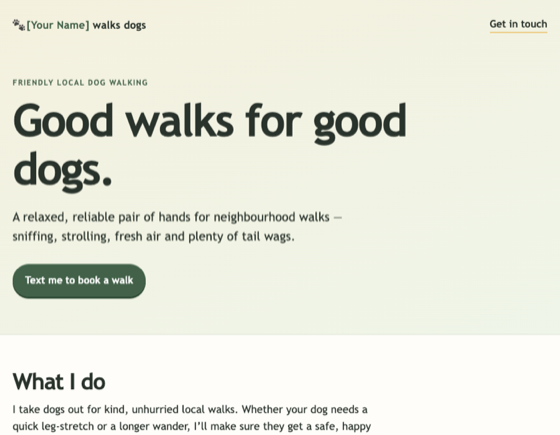
The dog walker’s one-page site Else produced, with the headline and booking button in place
neighbourhood-dog-walker.html
6.2 KB HTML Opens in any browser
Open this exact page →

The artifact itself, ready to open. Not a wireframe and not a description of one — the page, written and built, with the booking button already on it.
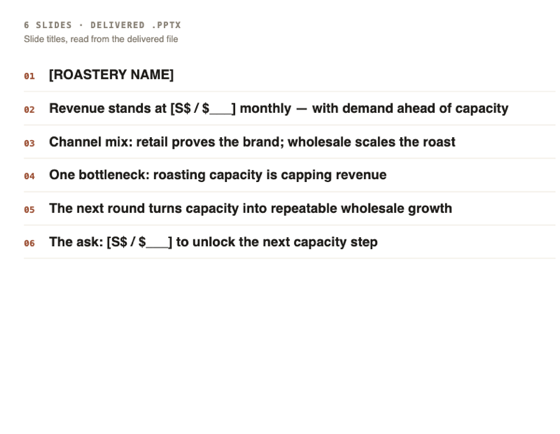
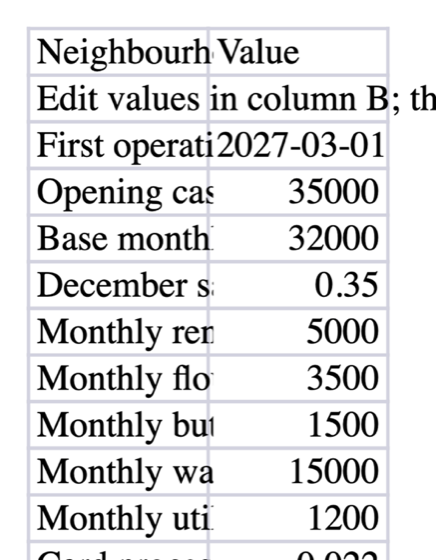
Real work, not mockups

Six files Else actually produced.
Open any of them right now.

No signup, no demo request, no illustration standing in for a screenshot. These are the real outputs, in the formats you would have had to build by hand.

Hand over your first job
What makes Else different

Four things that follow
from handing work off.

You get the artifact, not the transcript
ChatGPT: the output is a conversation — excellent, and then you rebuild it into the file you needed. Else: the output is the file. A job ends with a .pptx, .xlsx, .docx, .pdf or an .html page you can open, send or publish as it stands.
Close the tab and walk away
Start a job at lunch and shut the laptop. Else keeps working and your phone tells you when the file is ready. Once a run has gone past the dollar ceiling you set, it stops and asks — and you can answer from the lock screen without opening anything.
Standing jobs that outlive the conversation
Give a job a repeat — every 30 minutes through weekly — and it just keeps doing it: the inbox digest at 8am, the numbers every Friday, a price watched until it drops. Every individual run accounts for itself in dollars, so a standing job never becomes a bill you stopped reading.
It works inside your apps, and asks first
Gmail, Google Drive, Slack, Notion, GitHub and Airtable among others — it reads only what you allow, and sending, publishing, buying or changing anything asks you before it happens. Handing work off should not mean handing over the keys.
Start free — no card
Feature comparison · Data as of 26 August 2026

Else vs ChatGPT, side by side.

Every ChatGPT cell is quoted from a page OpenAI publishes; every Else cell is checkable in the product. Read each row as true on the date above, not for ever — this is the fastest-moving product on the list.

What you are comparingElseChatGPT
What you get backThe finished artifact — deck, spreadsheet, document, PDF or an HTML pageAn answer in the conversation, with files available in some flows
Published examples you can openReal outputs with the files attached, no signupProduct pages and documentation
Work continues with the tab closedYes — for a handed-off task, a phone notification when it finishes (if you turned notifications on)Yes, in agent and scheduled flows
Approve a step from your lock screenYes — a paused run asks, and you answer from the notificationNot found on the pages we checked
Recurring workAny handed-off job can repeat, every 30 minutes through weekly, each run receiptedOne-off and recurring scheduled tasks, plus change-watching — hourly at most on paid plans, daily on free
Pricing modelPay per task, in US dollars, nothing monthlyA monthly seat — free, $20 Plus, $100 and $200 Pro, and Business seats at $25 or $125 per user ($20 and $100 billed annually), two seats minimum
Cost of a month you do not use itNothingThe full seat price
What usage is counted inUS dollarsCredits, at a published rate per message that depends on the model picked
Per-task spending capIn dollars — $5 by default on work you hand off, set before the run startsNone found on the personal plans; Business has monthly limits in credits, off by default
Choosing the engineFour named tiers, changeable mid-task, or one named model per requestModels are named and selectable, by plan
Breadth of what it doesHanded-off work, and little elseChat, work and code in one place, by its own description
Team and enterprise accountsIndividual accountsBusiness and Enterprise plans
Public APINot yetYes — priced per token in dollars, pay as you go
AppsBrowser, installable as a web appWeb, iOS, Android and macOS — plus a separate Classic app for Mac and Windows
Best forWork you want to send away and receive as a finished fileThinking, drafting, asking — all day, on every device

The dollar figures for ChatGPT plans are taken from OpenAI's own help articles, which state US dollars, and not from its pricing page — that page serves local currency, and from where we checked it rendered Singapore dollars. The ChatGPT Go tier is left out on purpose: its help article publishes no figure, so we have no verified US-dollar price for it. Where a cell reads “not found”, that means it was absent from the pages we checked on 26 August 2026 — a statement about what is published, not about what exists.

Rechecked 26 August 2026, and three rows moved. ChatGPT Business now sells two seat types rather than one. OpenAI’s API rate for the model we quote fell from $5.00 to $4.00 per million input tokens, and from $30.00 to $20.00 on output. And the pricing-page footnote that used to put the desktop app on “macOS and Windows” is gone — the download page now offers macOS, with Windows covered by a separate Classic app — so that row was narrowed to match.

Start free — no card
When to use each

Most people should use both.

Keep the seat. Else has no plan, so adding it costs nothing until you actually hand something over.

Two different jobs
Reach for ChatGPT when…

You want one thing that does everything — chatting, writing, coding, images, voice — on every device you own. You are thinking out loud, drafting, or learning something. Several people need to work in the same place. You are building on an API. Or you want a free tier and one predictable monthly number with no per-job arithmetic.

Reach for Else when…

The thing you want at the end is a file, not a conversation. You would rather start it and walk away than sit and steer. You want a job to keep repeating without you, week after week. You want it working inside Gmail, Drive, Slack or Notion but asking before it sends anything. Or you hand off work rarely enough that a monthly seat for it makes no sense.

Frequently asked

Questions people actually ask.

Is there a ChatGPT alternative that delivers finished files?
Else is built for exactly that. A job ends with the artifact itself — a .pptx deck, an .xlsx spreadsheet, a .docx proposal, a .pdf itinerary or an .html page — handed back ready to open, not described in a chat window for you to rebuild. Real examples are published with the files attached, so you can download one before you sign up for anything.
Can it keep working after I close the tab?
Yes. Handing a job to Else is a hand-off, not a session: start it at lunch, close the app, and your phone tells you when the file is ready. Once a run has gone past the dollar ceiling you set, it stops and asks whether to continue — you can answer from your lock screen. Nothing waits for you to be sitting in front of it.
Can it run the same job every week without me?
Yes. Any handed-off job can carry a repeat, from every 30 minutes through to weekly — digest the inbox at 8am, summarise the numbers every Friday, watch a price and ping you when it drops. Each individual run produces its own itemized receipt in US dollars, so a standing job never becomes a cost you have stopped watching.
How much does ChatGPT agent mode cost?
In credits, OpenAI publishes the rate: one message in agent mode is 30 credits, and a deep-research task is 50. In dollars, you cannot work it out — we could find no credit-to-dollar rate published anywhere on its pages, so any dollar figure would be someone's guess. Else charges in dollars and prints the amount on a receipt beside the engine tier that produced it.
Is Else worth it if I already pay for ChatGPT?
Keep the seat — most people should. The two are shaped for different moments: ChatGPT is where you think, draft and ask; Else is where you send work away and get an artifact back. Because Else has no plan, adding it costs nothing until you actually hand something over, and a month you hand off nothing costs nothing at all.
Can ChatGPT do scheduled tasks?
Yes. OpenAI's own help centre says users can schedule one-off and recurring tasks, and can ask ChatGPT to watch for changes and notify them when something meaningful moves. This is not a gap. What differs is the unit: on Else every individual run of a standing job ends with its own itemized receipt in US dollars, beside the tier that produced it.
What does ChatGPT cost per message?
OpenAI publishes a per-message rate in credits that depends on which model you picked — 10 credits on one model and 50 on a higher one, on the rate card for its business plans. It does not publish what a credit costs in money. Else has no per-message price at all: you are charged for what a run actually used, in dollars, and the receipt shows the total beside the tier it ran on.

Stop copying answers
out of a chat window.

Start free — no card

Keep your subscription · One job, one file, one receipt · Price depends on the tier — Auto, Fast, Smart, or Max.

ChatGPT is a trademark of OpenAI. All trademarks are the property of their respective owners; their use here is for identification and comparison only and does not imply endorsement or affiliation. Comparison based on publicly available information as of 26 August 2026. Spot an inaccuracy? Email hello@elsedoes.com and we'll fix it.

Last updated 26 August 2026.

Try Else