Round one: it came back empty-handed
The first attempt did not produce a file. It planned the workbook, reached for the spreadsheet tooling twice, failed both times, and then said so:
What it gave instead was the whole structure in text — sixteen columns for the register, the summary tabs, seven VAT treatment values, and working formulas written out for copying into Excel by hand.
That content was correct. It was also not what was asked for. The request said "build me the exact spreadsheet template", and a description of a spreadsheet is not a spreadsheet.
The failed attempt still settled as a normal charge on Smart — and it cost more than the successful second one did. A run that delivers none of the artifact it was asked for is not free.
What we did about it
The failure was not random. Both attempts came back with the identical complaint about a value that should have been text arriving as a structure — which pointed at the richer spreadsheet features: frozen header rows, charts, per-cell currency formatting. So the second attempt kept the request identical and added one constraint: skip all of that, plain cells and formulas only, and give me the file.
That is the whole intervention. No rephrasing, no coaxing, no splitting the job into pieces.
Round two: one pass, and cheaper
- Made a plan
- Picked up the spreadsheet tooling
- Built the workbook
- Looked for the file it had just written
- Listed the folder to confirm
- Handed the file over
- Finished
Two of those seven steps are it checking its own work — looking the file up on disk before claiming it exists, rather than assuming the build succeeded.
Is the workbook any good?
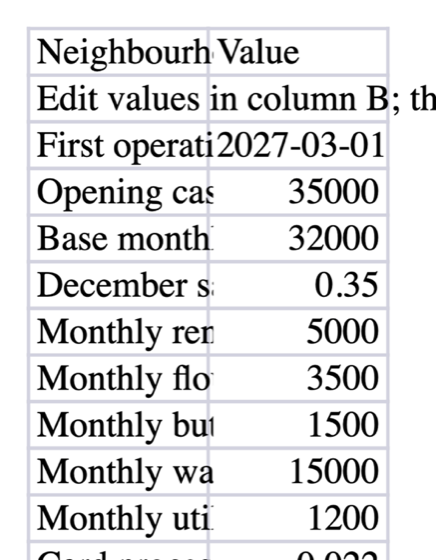
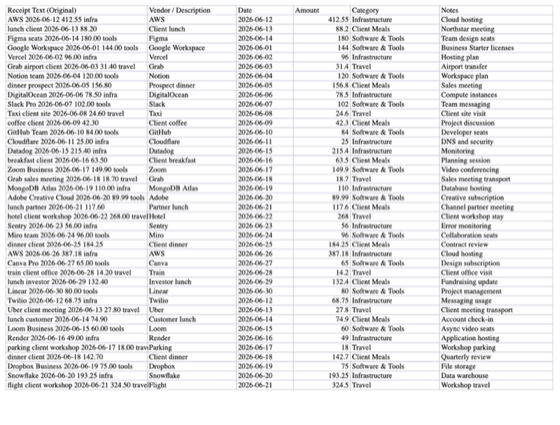
Invoice Register, Totals by Supplier, Totals by Month. Named plainly, in the order the request listed them.
Sixty cross-sheet lookups pull supplier totals straight from the register, so adding a row on the first tab updates the summaries. A template that had the numbers typed in would look identical and be useless by the second week.
Round one's text told you to type the first day of every month into a column and match on date ranges. Round two buckets the month out of the invoice date itself, so you enter nothing. Narrowing the request produced the better design, which is not the direction that usually goes.
The register carries a free-text VAT treatment column rather than a fixed list. That is defensible — treatments vary by jurisdiction — but the request came from someone who explicitly did not want to have to ask their bookkeeper, and a free-text column is exactly where you end up asking.
The honest verdict
Two runs to get there, and the thing that arrived is a working template a bookkeeper would recognise on sight. The receipt below covers the run that produced it; the failed first attempt was charged separately.
But it took two runs, and the first one failed in the least useful way available: the error it hit did not say which field was wrong, so it retried the same call unchanged and then gave up. That is our bug, not the model's. Someone who did not know to say "keep it simple" would have walked away from round one with a wall of text and a charge, and concluded the product cannot make spreadsheets — while the successful run above shows it plainly can.
Worth showing precisely because it went wrong first. See both runs: https://elsedoes.com/share/d11e709b0ce64ed58a7cc86a9f09cc50